Software · Welding & Fabrication
From NDT report to repair procedures. And a WPS in three steps.
The Veristruct WPS Tool holds a register of welding procedure templates for each of four standards: AS/NZS 1554.1, AS/NZS 1554.4, AS/NZS 1554.5 and AS 3992. It selects the procedure, writes the WPS as PDF and Word, and turns the NDT reports in your inbox into a drafted repair procedure for each rejected indication, ready for your CMMS. Perpetual licence, with annual maintenance that keeps it current.
See It Work
Your next WPS, in 68 seconds.
Choose the standard, answer six questions, complete the sheet from your controlled copy and download it. Then an NDT report becomes drafted repair procedures, ready for review.
Voice-over with captions · 1 min 8 s
The Repair Planner
The report lands. The repairs get planned.
Most sites have a folder of NDT reports and no folder of repair procedures. The indications are real, the acceptance calls are made, and the planning waits for someone with the time and the welding background. The repair planner does that part.
Read the report
Upload the NDT report as a PDF. The tool reads it and lists each indication it finds: location, type, size as reported, and the acceptance call the report made.
Confirm the list
You check the extracted list before anything is planned. Nothing is drafted until you have confirmed it.
A procedure per repair
Excavation, the procedure template from the register that fits the joint and material, preheat and inspection fields left for your values from the standard, and re-inspection.
Straight to the CMMS
The work list exports as an SAP PM order sheet, CSV or JSON, so the repairs become work orders instead of a colour on a report. Until a procedure is reviewed, it goes out as a hold, not as welding steps.
The WPS Tool
Your WPS in three steps.
Working to a prequalified procedure still means building the WPS: finding the configuration the register holds for your joint, then filling in the sheet by hand. Three steps, and the document is done.
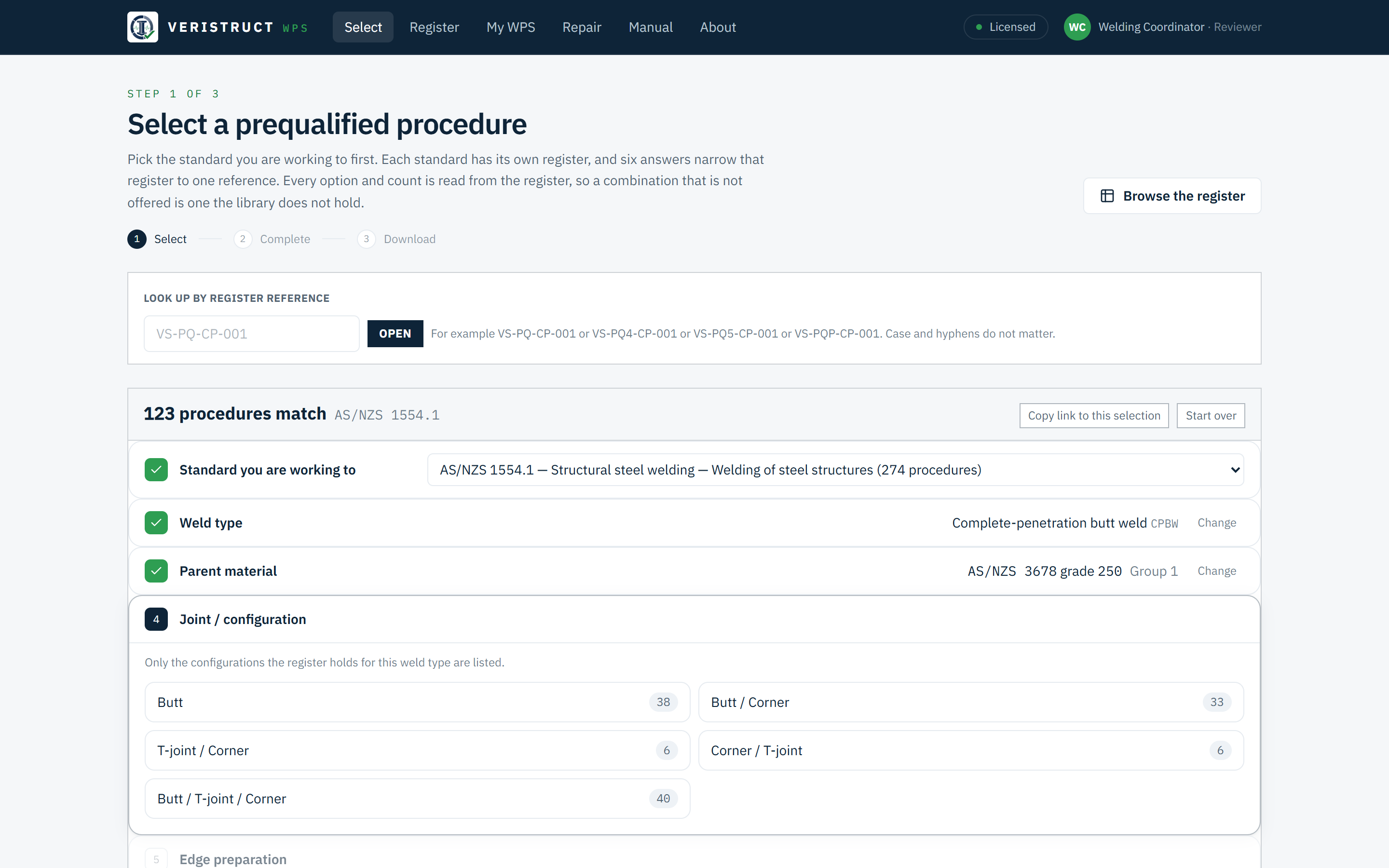
Choose the standard. Six answers narrow its register to one reference.
Weld type, parent material, joint, preparation, welded-from and process. Every option and every count is read from the register of the standard you chose. A combination that is not offered is one the library does not hold.
- Four registers. AS/NZS 1554.1 (274 procedures), AS/NZS 1554.4 (274), AS/NZS 1554.5 (218) and AS 3992 (36).
- Hard stops with the reason. A parent material the register has no template for ends the flow, and points to the register that covers it where the library holds one.
- Nearest valid combinations are offered when a path dead-ends.
- Look up by reference when you already know the procedure number.
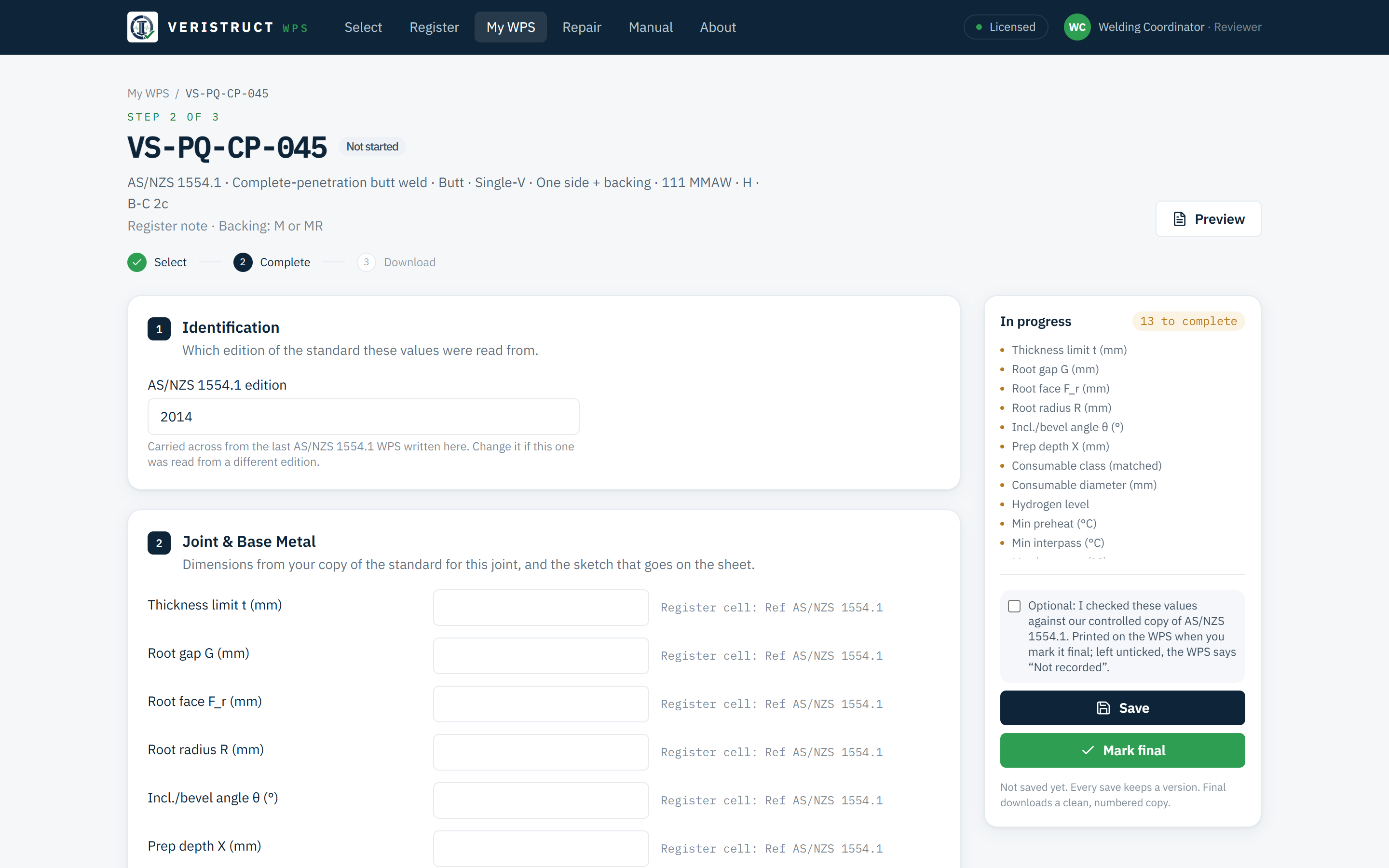
You enter the values from your controlled copy of the standard.
The tool lays out every field the WPS needs, in the order a welder and an inspector read them, and names the clauses to check in your standard. Your welding coordinator keeps the final say.
- Joint sketch library. Forty-nine schematics keyed to each procedure's joint identification, dimension-free, or upload your own.
- Arc energy worked out from the current, voltage and travel speed you enter for each run.
- Completeness count shows what is still blank. You decide when the WPS is final.
- Prequalification you confirm. Each template names the standard's prequalification clause. Tick it off against your controlled copy, and the WPS records who confirmed it and when.
- Every version kept. Reopen, revise, and the history stays.
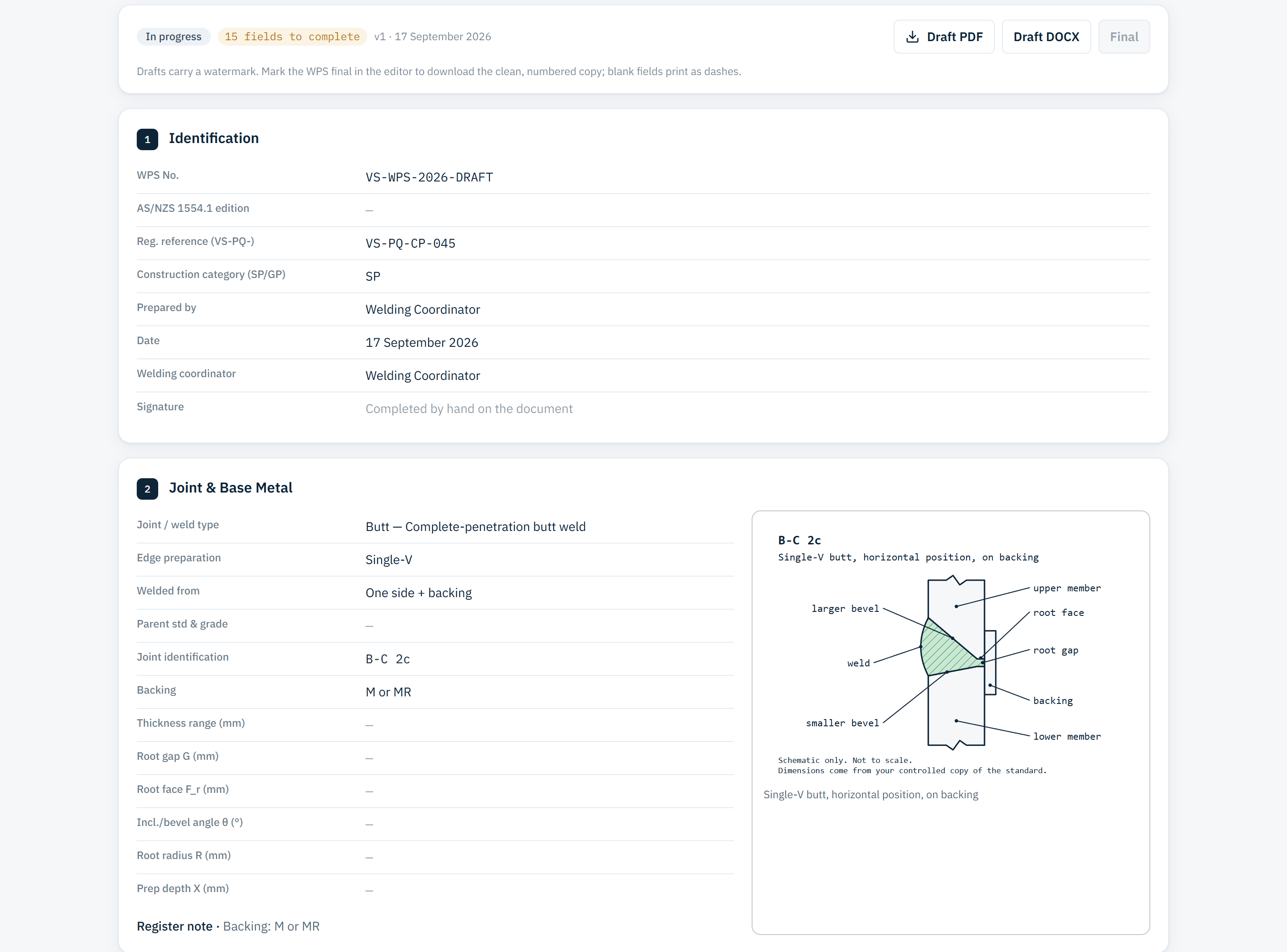
PDF and Word, in the six-section layout a welder and an inspector expect.
Watermarked while it is in progress, numbered when you mark it final. Your company name and logo head the document, and the WPS number carries your own prefix.
- Register browser with CSV export of any view.
- Draft and final downloads from the same record.
- The boundary on every page: the values are yours, and Veristruct certifies nothing.
- Your data, exportable. Everything you have entered saves as one file, at any time.
Boundaries, Stated Plainly
It is a tool for competent people. It is not the standard, and it is not certification.
The same boundaries a good welding coordinator would insist on, built into the software so nobody has to remember them under shutdown pressure.
Questions Buyers Ask
Straight answers.
Do I still need my own copy of the standard?
Yes. The tool finds the procedure, lays out the WPS and names the clauses to check. Your welding coordinator checks the values against your controlled copy before the WPS is marked final.
Do I need an AS 2214 welding supervisor to use it?
The tool does not require one. Welding coordination (AS 2214, ISO 14731 or the local equivalent) is your responsibility as the purchaser, and the output says so on every page.
Which standards does it cover?
Four, each with its own register: AS/NZS 1554.1 (steel structures), AS/NZS 1554.4 (high strength quenched and tempered steels), AS/NZS 1554.5 (structures subject to high levels of fatigue loading) and AS 3992 (pressure equipment). You choose the standard first, and every later answer reads only that register. Other parts of the AS/NZS 1554 series, such as reinforcing steel (Part 3) and stainless steel (Part 6), are not covered.
How is it licensed?
A perpetual licence for each named user, bought once, with annual maintenance that keeps it current. If maintenance lapses, the release you have keeps working; it stops receiving updates.
Can a licence be passed to someone else?
Each licence names one person and is active in one browser at a time. That person can move it to a new computer themselves, up to twice in any 30 days. When staff change, talk to us.
What does the maintenance fee cover?
Every software update, register updates as the standards and consumables change, and support. It is billed annually in advance and quoted with the licence. Where Veristruct hosts the tool for you, hosting is quoted with it.
Does the repair planner need the internet?
Reading a report and drafting procedures calls the AI model, so yes, and it uses your own Anthropic API key. Everything else (selector, editor, documents, register) runs on your own computer or server without an outside connection.
What does it export to SAP?
A maintenance-order upload sheet for SAP PM: one order per repair procedure and one operation per step, with hold points, the NDT method and the procedure reference. Dates, hours and priorities are left for your planner. CSV and JSON cover any other CMMS.
See It On A Call
Twenty minutes. A WPS from start to download.
We share a screen, take a procedure from selection to download, then run the repair planner on a sample NDT report. No obligation.
Rather have the procedures written for you? See welding procedures or all services.